For me to work with your character in Blender, you will need to provide your characters appearance data. Depending on whether you are a vanilla player or use mods/customizations, there are several ways to achieve that.
Please note that I can NOT work with .MCDF files. The way actors are temporarily instanced from MCDF files is not compatible with the export plugins.
Table of Contents
Vanilla Characters
If you are a mod-free vanilla player, the easiest way to exchange character data is by meeting up on one of the servers in the Oceania datacenter that we can both travel to.
Bring the glamour(s) & outfit(s) that are relevant, I will take care of exporting what I need.
If the work includes partial nudity, I can pick a suitable body replacement for that if you provide some information about the characters general physique.
Modded Characters
Option 1: Lightless + Meet Up.
We meet up on Oceania or one of the Europe Data Centers, pair with Lightless, you wear the glamour(s) & outfit(s) that are relevant, and I take care of exporting what I need with no extra work for you.
Option 2: You do the export yourself
- Install the Meddle plugin from the meddle repository:
https://raw.githubusercontent.com/PassiveModding/Meddle/main/repo.json - Make sure your character is shown on screen exaclty like they should look like. If weapons are relevant, they must be shown. If the hat is relevant, it must be visible.
- Open Meddle with the
/meddlecommand. Export:
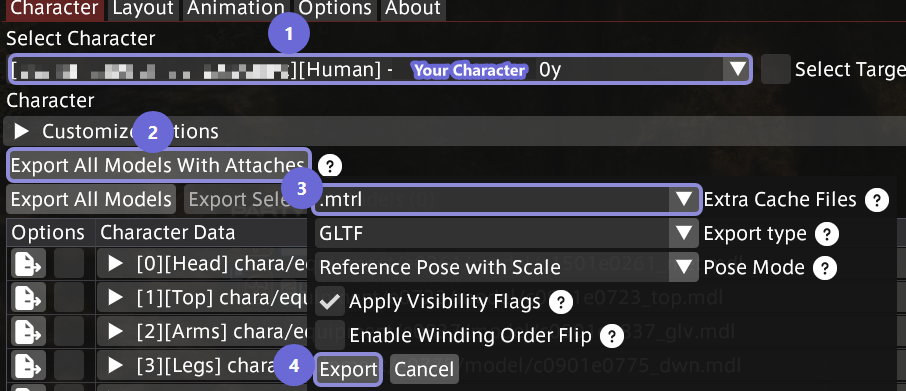
- Select your own character
- Click on Export All Models With Attaches
- Add .mtrl to the Extra Cache Files selection
- Click on Export
- This will produce a directory with several files and subdirectories in it. Depending on the amount of mods active this can range anywhere from 10 to 100 MB (or more in rare cases). Add everything to a single ZIP or 7z archive, give it a proper name ("MyCharacter-Casual Glam.zip"), and send that archive to me.
- Repeat from step 2. for any variation/extra outfit that may be relevant. If the nature of the commission is erotic/adult oriented, please always also include a fully nude version.
Customize+
If you're using Customize+, please provide your profile string as well. You can export that from the Customize+ menu, and it'll look something like this:
H4sIAAAAAAAACuWWTW+cMBCGT/0f1VwLyBDAmGPTy6pqFbXp5wUZm...
IVCS & Custom Skeletons
If your body mod specifically uses an IVCS skeleton, please make sure it is enabled (if there is a toggle for it) before you export/we meet up.
Some body mods come with their own custom skeleton (Yet Another Skeleton, Skelomae Custom Skeleton, ...) - those are generally IVCS compatible and should also be enabled and set to the most granular option (e.g. "Posing" on Yet Another Skeleton).